Skip Navigation
MyEngage
Manager Portal
Employee Portal
"Expect More" Portals
Our Services
Expand
Brokers
Company
Expand
About Engage PEO
Leadership
Careers
Blog & News
Contact
Our Services
View All Services
Human Resources
Payroll & Tax Administration
HR Technology
Employee Benefits
Risk Solutions for Your Workforce
Brokers
Company
About Engage PEO
Leadership
Careers
Blog & News
Contact
MyEngage
Manager Portal
Employee Portal
"Expect More" Portals
Our Services
Human Resources
Payroll & Tax Administration
HR Technology
Employee Benefits
Risk Solutions for Your Workforce
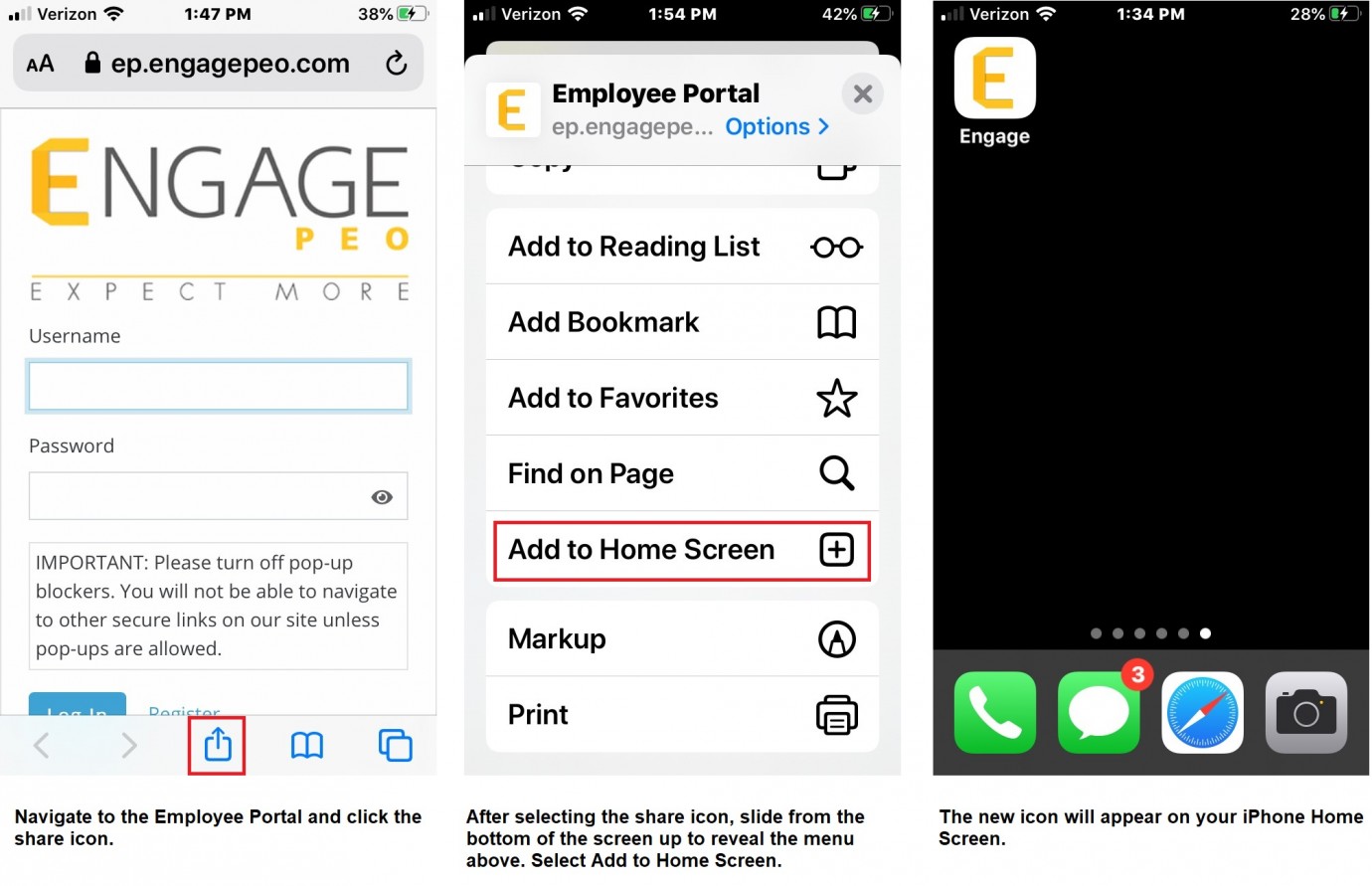
Adding an iPhone App Icon
Modal Popup. Press Escape to close in any moment
We’ve Updated Our Look
You’ll find everything you need in the top navigation, including support on the Contact page.
Got It
 MyEngage